

Asset Library vs. Project-Based Creative: Why the Best B2B Brands Think in Libraries
Most B2B brands treat creative like a monthly rent check - paying for assets that vanish the moment a campaign ends. This framework reveals how to turn your production into a compounding "savings account" that cuts costs while building architectural brand equity

Mirhayot Yunusov
Co-Founder at Eloqwnt | LoloPepe

Two B2B companies run the same creative sprint. Same brief. Same deliverable count. Same production team size. At the end of the sprint, both have 15 new assets.
Company A stores them in a shared drive folder labeled “Q2 Campaign Assets.”
And the Company B enters them into a tagged library: by channel, format, ICP segment, performance status, and reuse eligibility.
Six months later, Company A is running their eighth sprint at the same per-asset cost as their first. Every sprint starts from scratch. Company B is running their eighth sprint at 40% lower per-asset cost than their first - because 60% of each sprint’s visual components are adapted from the library rather than produced from zero.
Same inputs. Different architecture. Compounding divergence.
THE CORE DISTINCTION
Project-based creative treats every deliverable as a standalone: one brief, one production cycle, one output. Asset-library creative treats every sprint as an investment in a compounding repository: one brief produces 10–15 adapted outputs, each tagged and stored for reuse. The per-asset cost of project-based production stays constant. The per-asset cost of library-based production declines with every sprint.
The Core Distinction: Deliverables vs Capital
In the project-based model, creative is treated like a disposable coffee cup: you pay for production, hit "publish," and watch its value vanish into the archive as soon as the campaign ends. The knowledge of what actually worked remains trapped in the team's heads rather than being built into a system.
Does your creative production feel like a mortgage (building equity) or like rent (just a monthly expense with nothing to show for it?)
In the asset-library model, creative is capital. Every element becomes part of a compounding repository: templates from Sprint 1 continue to perform in Sprint 12, and validated copy angles serve as the foundation for new briefs. Your asset library is your creative 'savings account.' Every sprint is a deposit that pays interest through lower costs and accelerated launches.
The difference isn't philosophical - it’s financial. While the project-based approach keeps the per-asset TCO (Total Cost of Ownership) consistently high, the library model ensures it continually declines.
How to Recognize Which Model You’re Running
Most B2B companies believe they have elements of both models. The diagnostic is specific:
You are running project-based production if:
- Each new campaign or content sprint requires a new brief from scratch, with no reference to previous sprint briefs or outcomes
- Completed assets are stored in folders organized by campaign or date, not by reuse criteria
- When a new team member joins, there is no library document that explains approved angles, visual templates, or validated copy hooks
- Per-asset production time in Sprint 8 is approximately the same as Sprint 1
You are running library-based production if:
- New sprint briefs reference the Learning Log and pull from validated angles in the strategic layer
- Visual templates from previous sprints are in active use, with adaptation rather than rebuild as the default
- Assets are tagged by performance status (winning, testing, underperforming, evergreen) and reuse eligibility
- Per-asset production time has declined measurably since Sprint 1
Most companies reading this diagnostic will identify themselves as primarily project-based with informal library elements. The shift to library-based production is primarily an organizational and process change - it does not require new tools, new budget, or new headcount.
The ROI Comparison: Project-Based vs Library-Based Over Time
Efficiency in B2B creative is about the mathematical divergence between consuming budget on standalone tasks and investing it into a self-improving system.

The project-based per-asset cost declines marginally as the team becomes more efficient with the workflow. The library-based per-asset cost declines significantly as the library’s compounding assets (templates, validated angles, performance data) reduce the setup and production cost of each new sprint.
The financial implication: a company producing 15 assets per sprint, running 2 sprints per month, over 12 months produces 360 assets. At project-based rates averaging $270/asset: $97,200 total production cost. At library-based rates with the efficiency curve above, averaging $180/asset: $64,800 total.
The library generates $32,400 in production cost savings over 12 months - without any reduction in asset quality or volume.
Brand Consistency as a Library Byproduct
Brand consistency is typically managed through enforcement: brand guidelines, approval workflows, stakeholder reviews. Enforcing brand consistency manually is a nightmare of endless Slack pings and 'final_v2_FIXED' files. It works for a while, but eventually, you spend more time playing 'brand police' than actually building the brand.
Library-based production makes brand consistency architectural rather than enforced. When every asset is built from the same approved visual templates, the same validated copy frameworks, and the same master brief structure, consistency is the natural output of the production process. It does not require additional review layers because the inputs are pre-approved.
The practical result: library-based production teams spend less time in brand review cycles than project-based teams producing the same volume. The library’s pre-approved components eliminate the review questions at the source. A designer working from an approved visual template does not need to check whether the color usage is correct - the template is correct by definition.
The Reuse and Adaptation Framework
The highest-leverage application of library-based thinking is the adaptation framework: one approved core creative direction adapted across every relevant format and channel.
Example: A validated copy angle (“the hidden cost of freelancer management”) lives in the library’s strategic layer. When this angle is used in a sprint, it generates:
- LinkedIn long-form post - narrative treatment, 900 words
- LinkedIn carousel - 8-slide data breakdown
- Meta ad static - hook + stat, conversion-focused
- Meta ad video script - 30-second hook-story-CTA
- Email subject line variants - 5 options testing different hook framings
- Blog post hook - adapted from LinkedIn post with SEO expansion
Project-based creative is like buying a new wardrobe for every single meeting. Library-based creative is building a collection of timeless pieces that you can mix, match, and refresh as needed.
The angle was validated once. It is now deployed across six formats and three channels. The per-format production time is low because the strategic work (angle selection, proof point identification, messaging hierarchy) was done once and is stored in the library.
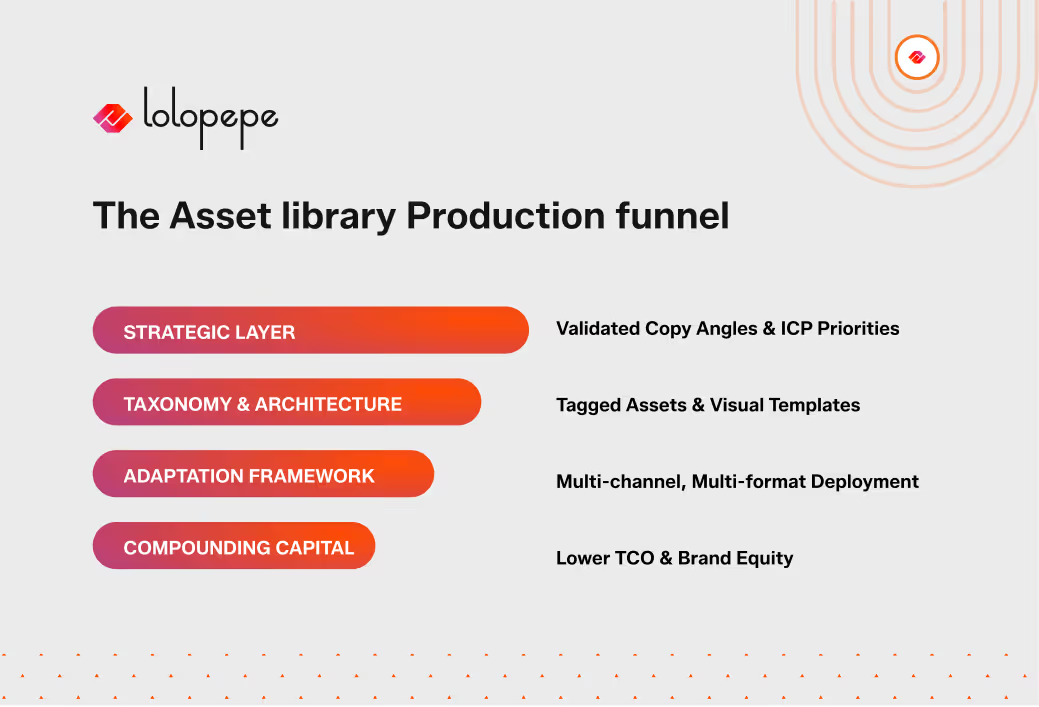
Over time, the library accumulates dozens of valdated angles, each with documented performance data indicating which ICP segments respond to it, which channels it performs best on, and which formats produce the highest engagement. This accumulated intelligence is what makes library-based production self-improving.
Making the Shift: What Actually Changes
The truth is: starting from a blank page is a luxury your B2B budget can no longer afford. It’s time to stop creating and start configuring.
The transition from project-based to library-based production does not require a large investment. It requires three operational changes:
1. Add a taxonomy layer to your existing storage. Your existing assets do not need to be reproduced. They need to be tagged. Create a consistent tagging structure (channel, format, ICP, performance status, reuse eligibility) and apply it retroactively to your existing asset archive. This converts a folder of files into a query able library.
2. Build the strategic layer. Document your approved copy angles, proof points, and messaging hierarchy in a single reference document. This is the strategic layer - the source material that future sprint briefs pull from rather than regenerate.
3. Shift brief construction from generative to selective. Instead of writing each sprint brief from scratch, start from the library: pull the highest-performing angle from the strategic layer, select the visual template from the visual library, reference the Learning Log for what worked last sprint. The brief becomes a configuration document, not a creation document.
These three changes can be implemented in one focused day of setup work. The compounding effect begins in Sprint 2.
Frequently Asked Questions
Q: How do you prevent the library from becoming outdated or irrelevant over time?
A: Think of it as a garden, not a warehouse. We use performance-based tagging to keep things fresh. Underperforming assets are quietly archived so they don’t clutter your workspace, while Evergreen content gets a health check every quarter. By reviewing your strategic layer every 90 days, your library stays sharp and aligned with your ICP priorities without ever needing a massive, painful rebuild.
Q: Can library-based production work for companies that produce primarily custom or bespoke creative?
A: Absolutely. Even the most unique masterpiece has a DNA of reusable components. You might create custom illustrations for every campaign, but you’re still using an approved color palette, a typography template library, and validated copy angles. The library provides the structural "bones" so your team can focus their energy on the "flesh"- the custom creative execution that makes you stand out.
Q: How does the library model handle creative that becomes dated — for example, offers or pricing that change?
A: We simply separate the "fast" content from the "slow" content. Anything with a shelf life -like pricing references or promotional claims - gets an expiry indicator and is archived the moment it expires. The real magic happens in the evergreen elements: the visual templates and positioning angles that stay relevant and keep building value long after a specific discount is gone.
Q: What tools do you recommend for managing a B2B asset library?
A: Don’t overcomplicate it. Start with what you’re already using - Notion, Airtable, or even a very disciplined Google Drive. The truth is, a brilliant taxonomy beats an expensive tool every time. Only look into a heavy-duty DAM (Digital Asset Management) like Bynder or Brandfolder once your library hits 500+ assets and finding things starts to feel like a full-time job.
The Bottom Line
Project-based creative production is the default because it is the path of least resistance. Each brief is self-contained. There is no system to maintain. The overhead is low - until you calculate the compounding cost of rebuilding from scratch every sprint.
Library-based creative production requires initial setup work and ongoing taxonomy discipline. In exchange, it delivers declining per-asset cost, architectural brand consistency, and a compounding repository of validated creative intelligence that makes every future sprint faster, cheaper, and better-informed.
At the end of the day, your creative budget is either an investment that grows over time or just another bill you pay every month. The way you build your production process decides which one it's going to be.
Download the Asset Library ROI Calculator - input your current sprint volume, per-asset cost, and sprint cadence to model the 12-month compounding savings from library-based production.
Book a Brand Content Audit (Trial) for $750. We’ll audit your production model and show you how to turn your creative expenses into compounding capital in just 60 minutes.
Mirhayot Yunusov
Co-Founder at Eloqwnt | LoloPepe
Mirhayot builds design-led ventures that make impact. He specializes in turning subjective intuition into scalable Brand Operating Systems that empower Series A+ companies to ship daily.
Through his articles, Mirhayot shares the design thinking, strategic frameworks, and creative decisions behind building brands that look and feel like leaders. Whether it's brand systems, web design, or motion his insights are built from real work with real companies.
Subscribe to our newsletter.
Get valuable strategy, culture, and brand insights straight to your inbox.