

Asset Library Strategy: How B2B Companies Scale Creative Output 10x Without Hiring
Linear scaling hits a wall of burnout and creative debt. One core direction can dispense 15+ outputs, slashing costs by 80%. This "Creative Vending Machine" ensures your marketing compounds instead of evaporating.

Mirhayot Yunusov
Co-Founder at Eloqwnt | LoloPepe

One team spends their entire Friday hunting for the 'final_final_v2' logo in a Slack thread. The other team just clicked a button and generated 40 assets for next week. The difference isn't talent - it's architecture.
Project thinking says: here’s a brief, produce an asset, deliver it, move to the next brief. One input, one output, every time. The workload scales linearly with volume. Want 10x the output? You need 10x the capacity.
Asset-library thinking says: here’s a core creative direction, produce the foundational unit, then adapt it into every format and channel it can serve. One input, 10 - 15 outputs. The workload scales with the quality of the initial production, not with the number of deliverables.
The 10x output difference is not a production speed difference. It is an architectural difference. Here’s how to build it.
WHAT IS A B2B ASSET LIBRARY?
An asset library isn't a 'folder of stuff.' It's a Creative Vending Machine. You put in one core strategy, and it dispenses everything you need for every channel, pre-approved and ready to run.
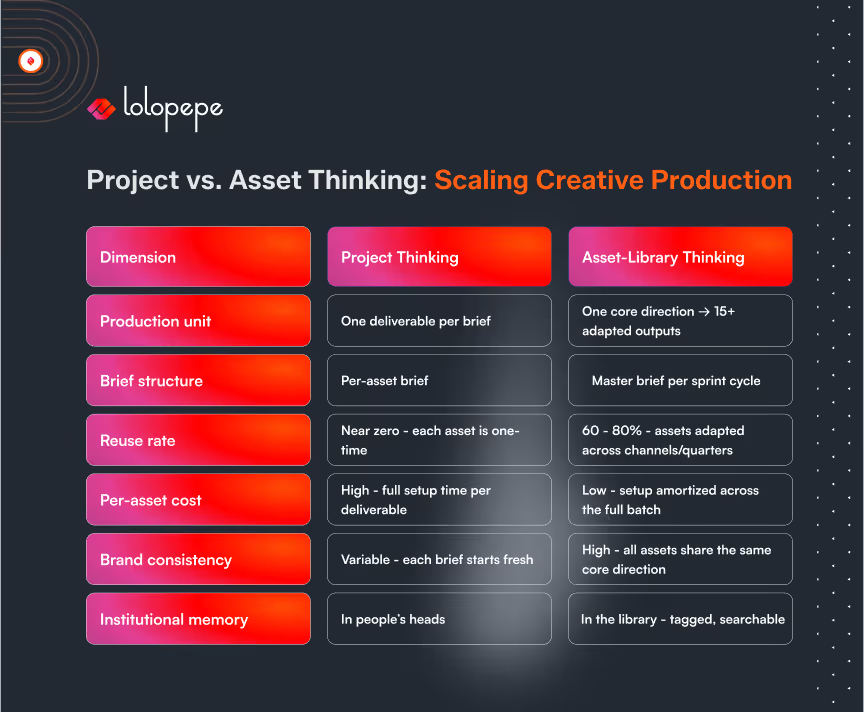
Asset-library thinking shifts production from ‘one brief = one deliverable’ to ‘one core creative direction = 10 -15 channel-ready outputs,’ reducing per-asset cost by 60 - 80%.
Project Thinking vs Asset Thinking: The Core Distinction
Project thinking is the default - and it’s linear, discrete, and unscalable.
It’s like carving a marble sculpture: you start from zero every time, and to get a second one, you must carve all over again.
Asset thinking is like Lego. You build the bricks - hooks, visuals, proof points - once, then snap them together to build a castle, a car, or a spaceship.
The structural flaw in project thinking is that every deliverable is a standalone.
The LinkedIn post has no relationship to the ad creative. Last month’s email is a stranger to this month’s landing page. Institutional knowledge lives only in people's heads, not in a system.
Asset thinking restructures this entirely:
The Asset Library Model: What It Is and How It Works
An asset library is not a folder of completed files. It is a structured repository of creative elements organized for reuse and adaptation. The distinction matters operationally.
A folder of completed files is a historical archive. An asset library is a production resource. The difference is in how the contents are organized, tagged, and built to serve future production.
An asset library contains four layers:
1. Strategic layer: Approved positioning angles, ICP pain point articulations, offer framings, and proof points. These are the raw materials that copy builds from. When a new sprint begins, the copywriter pulls validated angles from this layer rather than starting from scratch.
2. Copy layer: Approved headlines, hooks, body copy variants, CTAs, and subject lines - tagged by performance (winning / underperforming), ICP segment, funnel stage, and channel. A winning hook from a Meta ad last quarter is a candidate for a LinkedIn post hook this quarter.
3. Visual layer: Approved design templates, brand components, image assets, color palettes, and motion elements - organized by format (story, feed post, banner, email header) and channel. New assets are built by adapting templates, not by designing from scratch.
4. Performance layer: The Learning Log - documented sprint results, hypothesis outcomes, and iteration decisions. This layer makes the library intelligent: it’s not just what assets exist, but what the data says about each one.
Asset Taxonomy: How to Organize a Library That Scales
An untagged library isn't an asset; it’s a digital graveyard. Without a taxonomy, you aren't building a system; you're just hoarding files you'll never find again.
Every asset in the library should be tagged across five dimensions:
- Channel: LinkedIn / Meta / Email / Landing Page / Google / Other
- Format: Static / Video / Carousel / Story / Long-form / Short-form
- ICP Segment: Type A (Performance) / Type B (Brand) / Type C (Hybrid) / General
- Funnel Stage: TOFU (awareness) / MOFU (consideration) / BOFU (decision)
- Performance Status: Winning (scale) / Testing (active) / Underperforming (archive) / Evergreen (reuse)
With this taxonomy, a brief for “three Meta ad statics targeting Type A ICP at MOFU” generates an immediate query against the library: show me all Meta static assets, Type A segment, MOFU stage, performance status Winning or Evergreen. The brief is half-written before production begins.
One Core Direction: Multiple Outputs
The highest-leverage application of asset-library thinking is the adaptation model. One core creative direction - one positioning angle, one visual treatment, one ICP moment - produces assets across every relevant format and channel.
Example: Core direction is “the hidden cost of freelancer management for B2B CMOs.” From a single batch production day:
- LinkedIn long-form post: narrative version, 800 - 1,200 words, organic reach
- LinkedIn carousel: 8-slide breakdown of the five hidden cost components, organic engagement
- Meta ad static: hook + stat (“Your $800 freelancer costs $4,500/month”), conversion-focused
- Meta ad video script: 30-second hook-story-CTA, same angle
- Email subject line variants (5): testing different hooks on the same theme
- Email body: expanded version of the LinkedIn post, nurture-focused
- Landing page headline: “Stop calculating freelancer cost by the hour. Here’s the real number.”
- Blog post intro hook: repurposed from the LinkedIn long-form with SEO expansion
That is 10 - 12 channel-ready assets from one creative direction, one batch production session, and one master brief. The per-asset cost - including strategy, copy, design, and management time - is 70–80% lower than producing each asset from a separate brief.
Building Your Library: Phase-by-Phase Roadmap
Phase 1 - Foundation (Sprints 1–2)
Build the strategic layer. Document your approved positioning angles, ICP pain point articulations, and proof points. These don’t require design work - they require strategic clarity. Create your taxonomy structure and your master brief template. Set up the library infrastructure (a Notion database, Airtable base, or even a well-structured Google Drive with consistent naming conventions).
Phase 2 - Seed Production (Sprints 3–5)
Produce the first batch of core assets using the adaptation model. Prioritize evergreen angles - positioning content that won’t date quickly. Build out the visual template library. Document the Learning Log for each sprint.
Phase 3 - Library Growth (Sprints 6–12)
Each sprint adds to the library systematically. Performance data from each sprint updates the performance tagging. Winning assets get documented, analyzed, and used as the creative brief for new variants. The library begins compounding.
Phase 4 - Mature System (Sprint 13+)
New sprint briefs are written by pulling validated elements from the library. A new hire or vendor can onboard using the library as the sole creative briefing document. The library has replaced institutional memory with institutional infrastructure.
The library is your brand’s insurance policy. When your head designer leaves or a new agency comes on board, you don't lose six months of progress. The library doesn't quit. It doesn't forget. It turns the 'magic' inside people's heads into a tangible asset on your balance sheet.
The Compounding Advantage: Why Libraries Get More Valuable Over Time
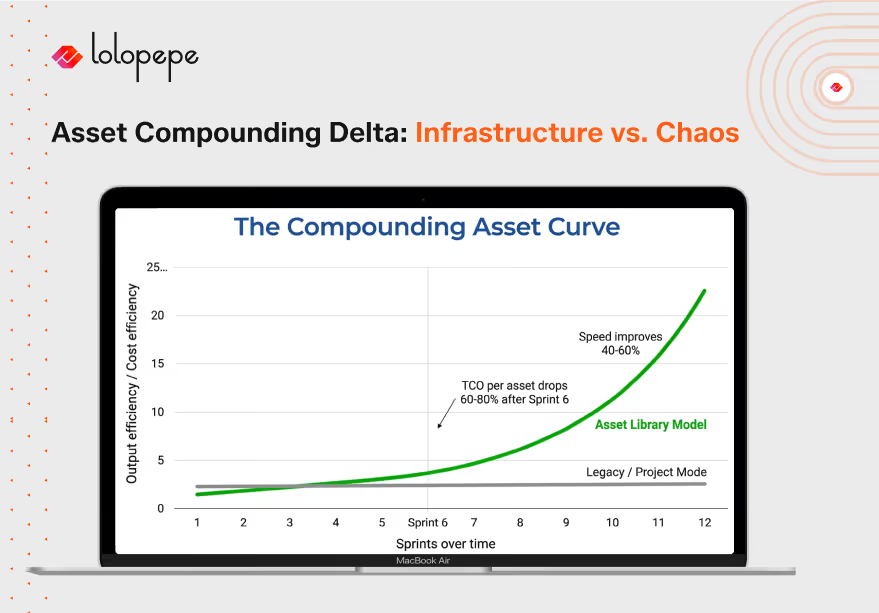
A project-based production model produces a linear output curve. More projects = more assets. The relationship is 1:1, and it doesn’t improve over time.
An asset library produces a compounding output curve. Each sprint adds to a base that makes future sprints faster, cheaper, and better-informed. By Sprint 12, your team is producing assets 40–60% faster than Sprint 1 - because the strategic layer is pre-built, the visual templates exist, and the copy layer contains validated angles to build from.
The compounding is financial as well. Per-asset TCO in a mature library system is typically 60 - 80% lower than per-asset TCO in project-based production - because the fixed setup costs (strategic development, template creation, brand documentation) are amortized across hundreds of assets rather than paid fresh each time.
Frequently Asked Questions
How much time does it take to build the initial library infrastructure?
The strategic and taxonomy layer can be built in one focused day: a 4 - 6 hour session to document approved angles, create the tag structure, and set up the organizational system. The visual template layer requires one additional production sprint (2 days) to build the core format templates. Total upfront investment: 3 - 4 days. Payback begins in Sprint 2, when production speed increases and per-asset cost begins declining.
What tools work best for managing an asset library?
The tool is less important than the taxonomy. A well-structured Notion database with consistent tagging outperforms an expensive DAM (Digital Asset Management) system with inconsistent tagging. Start with what your team already uses: Notion, Airtable, or Google Drive with a naming convention. The critical requirement is searchability by the five taxonomy dimensions. Upgrade to a dedicated DAM only when library volume exceeds 500+ assets.
How do you prevent the library from becoming outdated?
Two maintenance practices: (1) Performance-based tagging updates. After each sprint review, update the performance status of active assets (Winning / Testing / Underperforming / Evergreen). Assets tagged Underperforming are archived, not deleted - they remain as documented learning. (2) Quarterly strategic layer review. Every 90 days, review the positioning angles and ICP articulations in the strategic layer for relevance. Markets evolve; the library should reflect current positioning, not six-month-old assumptions.
Can an asset library work for a team that produces primarily video content?
Yes - with one structural adaptation. Video asset libraries are built around scripts and visual concepts, not finished files. The reusable elements are: approved narrative frameworks (hook structures, story arcs, CTA scripts), visual treatment templates (color grading, lower-third styles, transition sequences), and modular b-roll categories. A 30-second video produced from a library framework takes 40–60% less production time than one built from scratch because the structural decisions are pre-made.
The Bottom Line
The companies producing 10x more creative without hiring 10x more people didn’t find a faster workflow. They changed what the workflow produces. One core creative direction adapted into 15 channel-ready assets is not a shortcut - it is a fundamentally different production architecture.
Project thinking will always cap your output at the rate of individual briefs. Asset-library thinking compounds: every sprint makes the next sprint faster, cheaper, and better-informed.
Your creative output doesn’t disappear after publishing. With the right architecture, it compounds. But only if it’s built as an asset, not a project.
Download the Asset Library Starter Kit - a ready-to-use Notion template with taxonomy structure, master brief format, and a sprint planning guide.
Experience the asset-first model on your own brand. Start a 7-Day Creative Sprint for $750.
Mirhayot Yunusov
Co-Founder at Eloqwnt | LoloPepe
Mirhayot builds design infrastructure for founders who have no time for fluff. He specializes in turning subjective intuition into scalable Brand Operating Systems that empower Series B+ companies to ship daily.
Through his articles, Mirhayot shares the design thinking, strategic frameworks, and creative decisions behind building brands that look and feel like leaders. Whether it's brand systems, web design, or motion his insights are built from real work with real companies.
Subscribe to our newsletter.
Get valuable strategy, culture, and brand insights straight to your inbox.